
WordPress主题备忘单为初学者
您是否在寻找WordPress主题备忘单来快速修改主题或创建新的自定义主题? WordPress附带了许多内置的模板标签,您可以使用这些标签来抢占先机。在本文中,我们将为初学者分享一个WordPress主题备忘单。
开始之前
WordPress带有强大的模板引擎,允许主题开发人员为WordPress驱动的网站创建漂亮的设计。您可以在您的网站上安装高级和免费的WordPress主题。
每个WordPress主题都附带了许多自定义选项。这些选项允许您更改颜色,添加标题图像,设置导航菜单等。
但是,您仍然受限于主题支持的功能。有时您可能希望对需要编码的WordPress主题进行细微更改。要做到这一点,您需要了解一些基本的PHP,HTML和CSS。
您要做的第一件事就是熟悉WordPress在幕后和WordPress主题模板中的工作原理。
之后,您可能需要遵循一些最佳做法。例如,创建子主题而不是直接对主题文件进行更改。
您还可以通过在计算机上安装WordPress来练习主题。
话虽如此,让我们深入了解我们的WordPress主题备忘单,供初学者使用。
基本WordPress主题模板
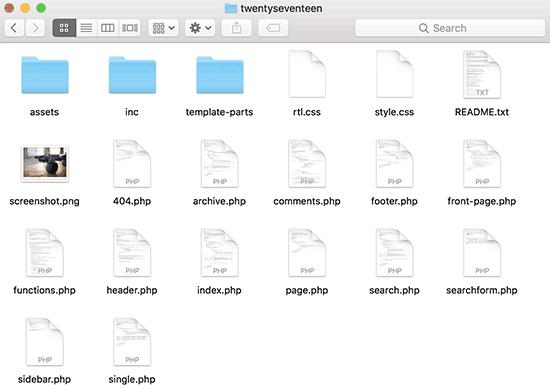
每个WordPress主题都由称为模板的不同文件组成。所有WordPress主题都必须有样式表和索引文件,但通常它们会提供很多其他文件。
以下是每个主题所具有的基本文件列表:
- style。 CSS
- 的header.php
- 的index.php
- 的sidebar.php
- footer.php
- 的single.php %%%% %% page.php文件
- 的comments.php
- 404.php
- 的functions.php
- archive.php
- searchform.php
- search.php
- 如果您正在构建自己的主题,那么您可以从其中一个WordPress入门主题开始。这些主题随时可以使用WordPress模板文件和CSS,为您提供构建的框架。
标题中的模板标签
WordPress附带了许多方便的功能,可用于在整个主题中输出不同的内容。这些函数称为模板标记。
首先,可能是所有符合标准的WordPress主题中最重要的函数称为wp_head,它看起来像这样:
此代码获取所有重要的HTML WordPress需要添加到您网站上每个页面的
<?php wp_head(); ?>
&lt; head&gt; 部分。许多WordPress插件在您的网站上正常运行也很重要。 以下是您通常会在主题的header.php文件中找到并使用的模板标记列表。但是,当您需要它们时,它们也可以在您的主题的其他地方使用。
// Title of the Blog, or Blog Name
<?php bloginfo("name"); ?>

// Title of a Specific Page
<?php wp_title(); ?>

// Exact URL for the site
<?php bloginfo("url"); ?>

// Site"s Description
<?php bloginfo("description"); ?>

// Location of Site’s Theme File
<?php bloginfo("template_url"); ?>

// Link to the Style.css location
<?php bloginfo("stylesheet_url"); ?>

// RSS Feed URL for the site
<?php bloginfo("rss2_url"); ?>

// Pingback URL for the site
<?php bloginfo("pingback_url"); ?>

// WordPress version number
<?php bloginfo("version"); ?>
其他主题文件中使用的模板标签
现在让我们来看看其他一些常用的模板标签及其功能。
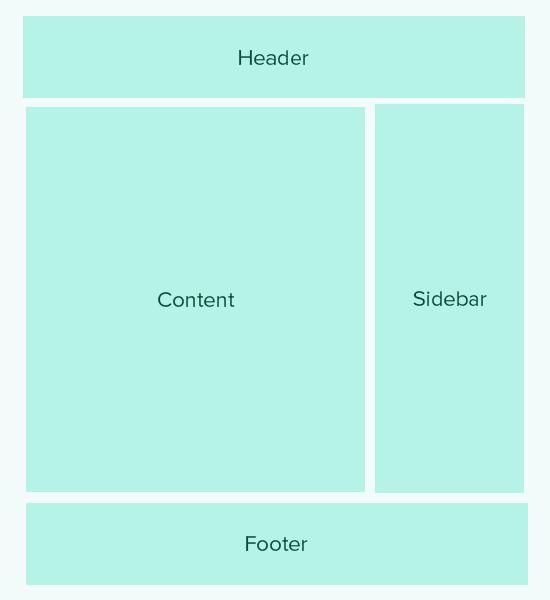
以下模板标记用于调用并包含其他模板。例如,您的主题的index.php文件将使用它们来包含页眉,页脚,内容,注释和侧边栏模板。
//Displays Header.php file content
<?php get_header(); ?>

// Displays Footer.php file content
<?php get_footer(); ?>

// Displays Sidebar.php file content
<?php get_sidebar(); ?>

// Displays Comment.php file content
<?php comments_template(); ?>
在WordPress循环中使用以下模板标记来显示帖子中的内容,摘录和元数据。
// Displays the Content of the Post
<?php the_content(); ?>

// Displays the excerpt that is used in Posts
<?php the_excerpt(); ?>

// Title of the Specific Post
<?php the_title(); ?>

// Link of the Specific Post
<?php the_permalink() ?>

// Category of a Specific Post
<?php the_category(", ") ?>

// Author of the Specific Post
<?php the_author(); ?>

//ID of a Specific Post
<?php the_ID(); ?>

// Edit link for a Post
// Oonly visible to logged in users with editing privileges
<?php edit_post_link(); ?>

// URL of the next page
<?php next_post_link(" %link ") ?>

// URL of the previous page
<?php previous_post_link("%link") ?>
WordPress主题带有名为Sidebars的小部件就绪区域。这些是主题文件中的位置,用户可以在其中拖放WordPress小部件。通常,主题具有多个位置,用户可以在其中添加小部件。
但是,最常见的是这些小部件区域位于主题布局的右侧或左侧边栏中。要了解更多信息,请参阅我们的指南,了解如何在WordPress主题中添加动态小部件就绪侧边栏。
以下是用于在主题中显示侧边栏的代码。
<?php
if ( ! is_active_sidebar( "sidebar-1" ) ) {
	return;
}
?>

<aside id="secondary" class="widget-area" role="complementary">
	<?php dynamic_sidebar( "sidebar-1" ); ?>
</aside><!-- #secondary -->
您需要将sidebar-1替换为您的主题为该特定小部件就绪区域或侧边栏定义的名称。
模板标签显示导航菜单
WordPress带有功能强大的菜单管理系统,允许用户为其网站创建导航菜单。 WordPress主题可以有多个导航菜单位置。
请参阅我们的指南,了解如何在WordPress主题中创建自己的自定义导航菜单。
以下是将在主题中用于显示导航菜单的代码。
<?php
wp_nav_menu( array(
    "theme_location" => "my-custom-menu",
    "container_class" => "custom-menu-class" ) );
?>
主题位置取决于主题用于注册导航菜单的名称。 CSS容器类可以被调用任何你喜欢的东西。它将围绕您的导航菜单,以便您可以相应地设置它。
其他模板标签
// Displays the date current post was written
<?php echo get_the_date(); ?>

// Displays the last time a post was modified
get_the_modified_time

// Displays the last modified time for a post
<?php echo the_modified_time("F d, Y"); ?>

// Displays post thumbnail or featured image
<?php the_post_thumbnail( ); ?>

// Displays monthly archives
<?php wp_get_archives( ); ?>

// Displays the list of categories
<?php wp_list_categories(); ?>

// Displays the gravatar of a user from email address
// 32 pixels is the size, you can change that if you need
<?php echo get_avatar( "[email protected]", 32 ); ?>

// Displays gravatar of the current post"s author
<?php echo get_avatar( get_the_author_meta( "ID" ), 32 ); ?>
WordPress中的条件标签主题
条件标签是返回True或False结果的函数。这些条件标记可以在整个主题或插件中使用,以查看是否满足某些条件,然后相应地执行某些操作。
例如,如果当前帖子具有特色图像。如果它没有精选图像,则可以显示默认的精选图像。
<?php
if ( has_post_thumbnail() ) {
    the_post_thumbnail();
}
else {
    echo "<img src="" . get_bloginfo( "stylesheet_directory" )
        . "/images/thumbnail-default.jpg" />";
}
?>
以下是您可以使用的更多条件标记。
// Checks if a single post is being displayed
is_single()

// Checks if a page is being displayed
is_page()

// Checks if the main blog page is displayed
is_home()

// Checks if a static front page is displayed
is_front_page()

// Checks if current viewer is logged in
is_user_logged_in()
您可以使用更多条件标记。条件标签的完整列表可以在WordPress codex页面中找到有关条件标签的内容。
WordPress循环
循环或WordPress循环是用于在WordPress中获取和显示帖子的代码。许多WordPress模板标签只能在循环内部工作,因为它们与post或post_type对象相关联。
以下是一个简单的WordPress循环示例。
<?php

// checks if there are any posts that match the query
if (have_posts()) :

  // If there are posts matching the query then start the loop
  while ( have_posts() ) : the_post();

    // the code between the while loop will be repeated for each post
    ?>

    <h2 id="post-<?php the_ID(); ?>"><a href="<?php the_permalink() ?>" rel="bookmark" title="Permanent Link to <?php the_title(); ?>"><?php the_title(); ?></a></h2>

    <p class="date-author">Posted: <?php the_date(); ?> by <?php the_author(); ?></p>

    <?php the_content(); ?>

    <p class="postmetadata">Filed in: <?php the_category(); ?> | Tagged: <?php the_tags(); ?> | <a href="<?php comments_link(); ?>" title="Leave a comment">Comments</a></p>

    <?php

    // Stop the loop when all posts are displayed
 endwhile;

// If no posts were found
else :
?>
<p>Sorry no posts matched your criteria.</p>
<?php
endif;
?>
要了解有关循环的更多信息,请查看WordPress(信息图)中的循环内容。
我们希望本文可以帮助您作为初学者的基本WordPress主题备忘单。您可能还想查看WordPress函数文件最有用的技巧列表。
评论被关闭。